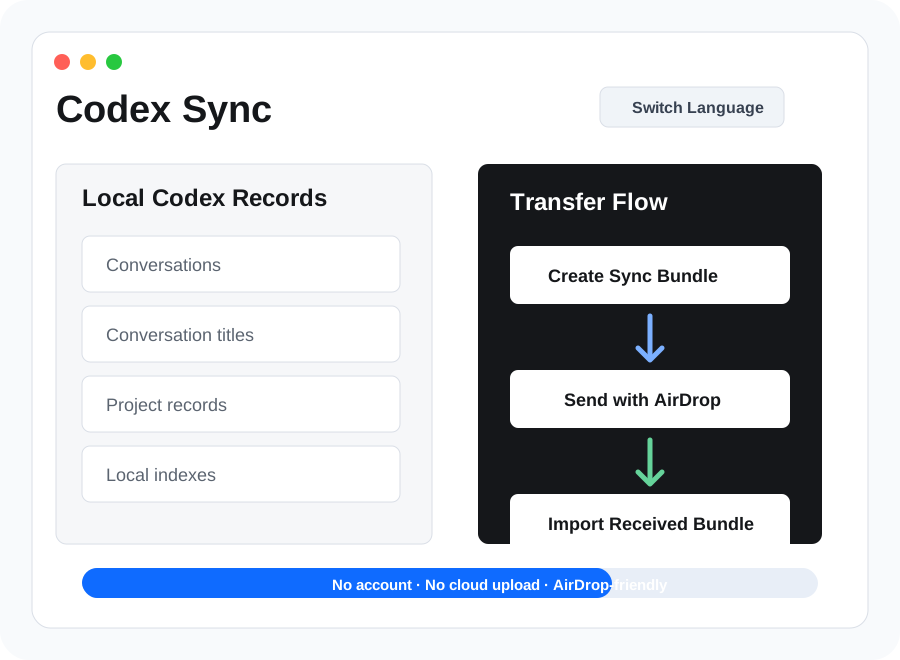
Create Sync Bundle
Codex Sync creates a `.codexsync` bundle from the local Codex records on your current Mac.
 Codex Sync
Local Codex transfer for Apple Silicon Macs
Codex Sync packages your local Codex conversations, titles, project records, and indexes into an AirDrop-friendly sync file so you can continue your Codex work on another Mac.
The pain point
If you use Codex on multiple Macs, your valuable local context can become fragmented: past conversations, titles, project records, and local indexes may live on the machine where the work started.
Codex Sync is built for that specific workflow: moving local Codex records from one Mac to another without setting up an account, exposing files to a cloud service, or manually digging through hidden data folders.
How it works
Codex Sync creates a `.codexsync` bundle from the local Codex records on your current Mac.
Transfer the sync bundle to your other Mac using Apple's built-in AirDrop workflow.
Open Codex Sync on the second Mac, choose the received file, and import the records locally.
Quit and reopen Codex so the imported conversations, titles, and project records can appear.
What it syncs
Move local conversation history so earlier Codex work can be available on another Mac.
Preserve the titles and indexes that help you recognize sessions after migration.
Transfer project-related Codex records that help connect work back to its context.
Package related local metadata that Codex uses to organize and read existing records.
Codex Sync does not sync arbitrary local documents, generated files, source repositories, or other outputs created during Codex sessions.
Privacy first
The app works with files on your Mac and creates a local sync bundle for transfer.
Send the bundle directly between your own Macs using AirDrop instead of a third-party storage account.
A `.codexsync` bundle can contain personal Codex conversations. Only send it to devices you trust.
Built for Mac users
Conflict handling
If a record already matches, Codex Sync avoids unnecessary replacement.
When content differs, the local original is kept and conflicting content is saved as a backup.
Title indexes, project records, and state data are handled so Codex can recognize imported records.
Installation notes
Codex Sync is distributed as a macOS installer package. Because it is a small independent utility, macOS may ask you to approve it from System Settings before first launch.
Recommended flow: quit Codex before importing, import the received `.codexsync` file, then reopen Codex to check conversations, titles, and project records.
FAQ
Use Codex Sync to create a `.codexsync` bundle on the first Mac, send it with AirDrop, then import it on the second Mac. Quit Codex before import and reopen it afterward.
Yes. Codex Sync is focused on local Codex conversations, conversation titles, project records, indexes, and related state records.
It creates a local sync bundle that you control. Codex Sync does not require login, registration, or cloud upload.
No. The current version is for macOS on Apple Silicon Macs, including M1, M2, M3, and M4.
No. Codex Sync is for Codex records and related local metadata. It does not sync arbitrary documents, repositories, or generated output files.
Fully quit Codex and open it again. Codex may need a fresh launch to read imported local records.
Ready to move your Codex work?
Codex Sync is for Mac users who want a simple local transfer path for Codex conversations, titles, project records, and indexes.
Buy Codex Sync